
Chrome Enhanced Autofill Gets Gmail Access for Orders and Flights
Chrome enhanced autofill can now pull order numbers, tracking and flight bookings from Gmail. Here is how the opt-in works and where to switch it off.
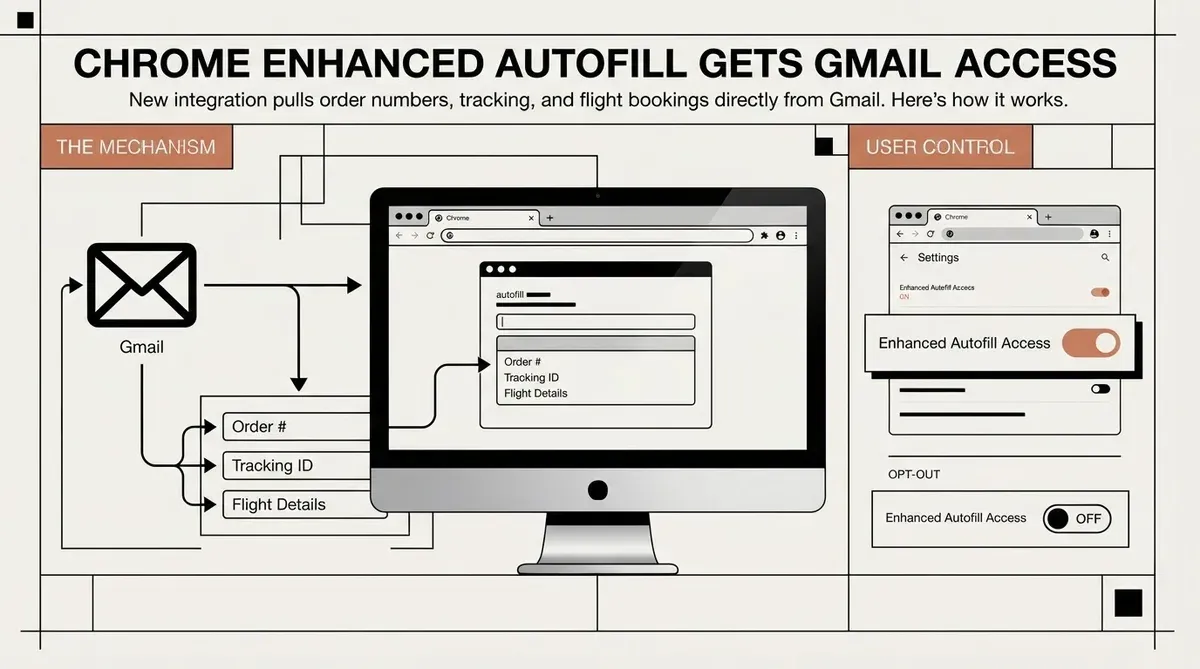
Chrome enhanced autofill can now suggest order numbers, tracking details and flight bookings pulled from Gmail while you complete online forms. The change, announced by Google on 28 October 2026, runs on Gemini with Personal Intelligence and starts in the United States on desktop, Android and iOS. The convenience is real, but it also gives an AI model a new route into the contents of your inbox, so the setup deserves a check before you switch it on.
What Chrome Can Read
The feature targets information that normally sits in confirmation emails: a purchase's order number, a parcel's tracking number and a flight booking. Hotel reservations also fall within its scope. Google says sensitive data shown as a suggestion is encrypted. Earlier autofill handled names, addresses and card numbers drawn from saved profile data, so this update changes the category of information involved: Chrome now reads the content of messages.
Google ties the lookup to the moment a form asks for the data, so the suggestion appears in the autofill dropdown rather than as a separate inbox view. Personal Intelligence in Gemini can draw on connected Google Workspace apps more broadly, so Gmail is the scope announced for this rollout, not necessarily the limit of the underlying technology.
The Opt-In Chain and the Off Switches
Three conditions have to line up before Gmail suggestions appear. The user needs Gemini in Chrome, the Personal Intelligence setting turned on, and enhanced autofill enabled in Chrome settings. The rollout covers U.S. users, and the feature is limited to people aged 18 or older.
- Gemini in Chrome enabled
- Personal Intelligence enabled
- Enhanced autofill enabled in Chrome settings
- U.S. account on desktop, Android or iOS
Google names the Chrome settings as the place to manage enhanced autofill. Turning off Personal Intelligence also removes the Gmail lookups, because the suggestions depend on it. Users who want Gemini in Chrome without Gmail access should check both settings, since the announcement does not describe a separate Gmail-only switch. When suggestions are available, the autofill dropdown shows a "Suggested by Gemini" option, which makes Gmail-sourced entries easy to spot before you accept one.
Trade-offs of Enabling Chrome Enhanced Autofill
The practical benefit is clear. The feature removes the step of switching tabs to copy a tracking number or booking reference into a form. The cost is standing access: once enabled, Gemini can reach a mailbox that often holds travel records, purchase histories and account messages.
The older model drew from data the user had saved deliberately in Chrome. The new path draws from live email, which changes with every new message. Frequent travelers and online shoppers gain the most, while users who keep Gmail tightly scoped or use a separate account for purchases will see little use.
Google states that Chrome keeps the sensitive values encrypted while they appear as suggestions. That protects the value in the form field, but it does not change the fact that the model has read the email to find it. Users who handle medical, legal or financial mail in Gmail should weigh that exposure before enabling the feature.
Users outside the United States get nothing from this rollout for now, and the announcement gives no timeline for other markets. Anyone who relies on Chrome on a work profile should also check whether the Gemini and Personal Intelligence settings are managed by an administrator before expecting the option to appear.
Verdict and What to Watch
The verdict is conditional. Enable the feature only if you already use Gemini in Chrome and Personal Intelligence, and only after confirming the toggles in Chrome settings. Treat it as an access grant to your inbox rather than a form tool. The next thing to watch is whether Google extends the rollout beyond the United States or to other Google apps, since the announcement covers Gmail only.
Availability is limited to the U.S. on desktop, Android and iOS, with Gemini in Chrome and Personal Intelligence required. The sources list no price, and the feature runs through existing Chrome and Gemini settings.
Why This Matters
Chrome enhanced autofill moves form filling from saved profile data toward live access to personal email. The gain is a few seconds per form, while the exposure covers everything the Gmail permission reaches. Anyone enabling it should first decide whether that trade is worth it.
Sources
Chrome's enhanced autofill helps you fill out forms with suggestions pulled from Gmail.
AI-generated image.
Related Articles
- Google Chrome AI Mode Launches to Revolutionize Web Research
- Google Chrome Launches AI Skills to Automate Browser Tasks
- Google Wallet TSA PreCheck Touchless ID expands to more travelers and airlines
✔Human Verified
Researched and cross-referenced against primary sources by the Bytevyte editorial team. This article was generated with the assistance of artificial intelligence and reviewed by the Bytevyte editorial team.